Gateway appearances
Payment gateway can have custom colors and logo.
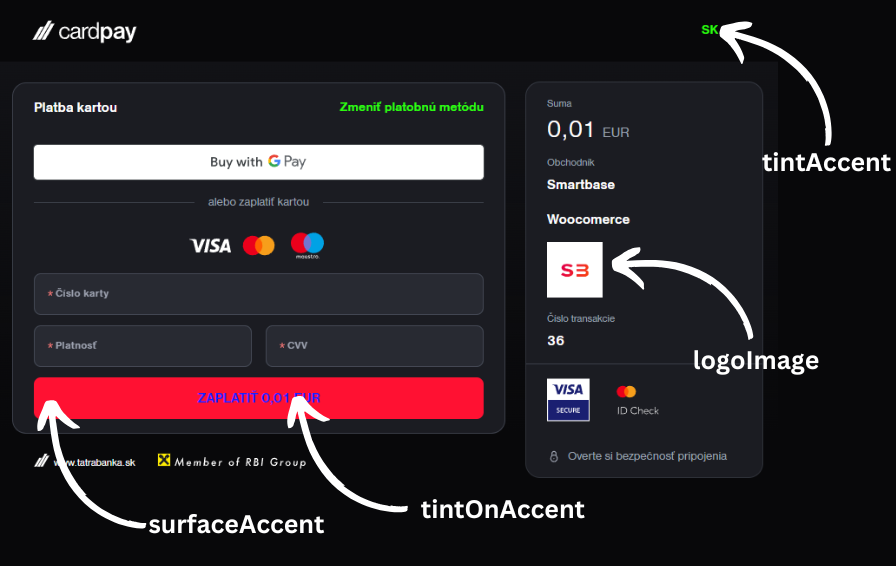
warning
Gateway appearances can be change only in PRODUCTION mode.
Logo
from tatrapayplus.client import TBPlusSDK
from tatrapayplus.models import *

client = TBPlusSDK(
    "your-client-id",
    "your-client-secret"
)

logo_data = AppearanceLogoRequest(
    logo_image="data:image/png;base64,iVBORw0KGgoAAAANSUhEUgAAAAgAAAAIAQMAAAD+wSzIAAAABlBMVEX///+/v7+jQ3Y5AAAADklEQVQI12P4AIX8EAgALgAD/aNpbtEAAAAASUVORK5CYII",
)

response = client.set_appearance_logo(logo_data)
Colors
from tatrapayplus.client import TBPlusSDK
from tatrapayplus.models import *

client = TBPlusSDK(
    "your-client-id",
    "your-client-secret"
)

appearance_data = AppearanceRequest(
    theme=AppearanceRequestTheme.SYSTEM,
    surface_accent=ColorAttribute(color_dark_mode="#fff", color_light_mode="#fff"),
    tint_accent=ColorAttribute(color_dark_mode="#fff", color_light_mode="#fff"),
    tint_on_accent=ColorAttribute(color_dark_mode="#fff", color_light_mode="#fff"),
)
response = client.set_appearance(appearance_data)
tip
Changes are reflected only in new payments. Refresh of page is not sufficient.